
Last year someone in cross-border home goods had fourteen accounts across North America, Europe and South-East Asia.
He described his day like this. Up at seven to post for North America, since that is their evening. Midday for South-East Asia. Another North America round in the evening. A check before bed for anything missed.
Fourteen accounts, three rounds a day, about twenty minutes each. But the part that bothered him was not the sixty minutes. It was the hours in between when he could not do anything else, because he was waiting for a time.
I asked why he did not prepare both the content and the times in advance. He had tried making a list, he said, but he still had to go and post each one himself.
That is exactly the gap. A list answers what to post. It does not answer who does the posting.
Two extra problems with overseas accounts
Compared with domestic accounts, two things have to be handled.
First, the time zone. Your day does not line up with the target market active window. Eight in your evening is a European afternoon. South-East Asian midday can be a Middle Eastern morning. So publish times cannot follow your habits; they have to be calculated backwards. That is what time zone publishing is about.
Second, the accounts are dispersed by nature. A dozen domestic accounts can run on one rhythm because user habits are similar. Overseas, they cannot. North America, Europe and South-East Asia differ in active hours, content preferences and even platform. One rhythm will not serve all of them.
Stack those together and the problem stops being about volume and becomes about the timeline.
Fix the mapping first
This is the premise for everything and the step most often skipped.
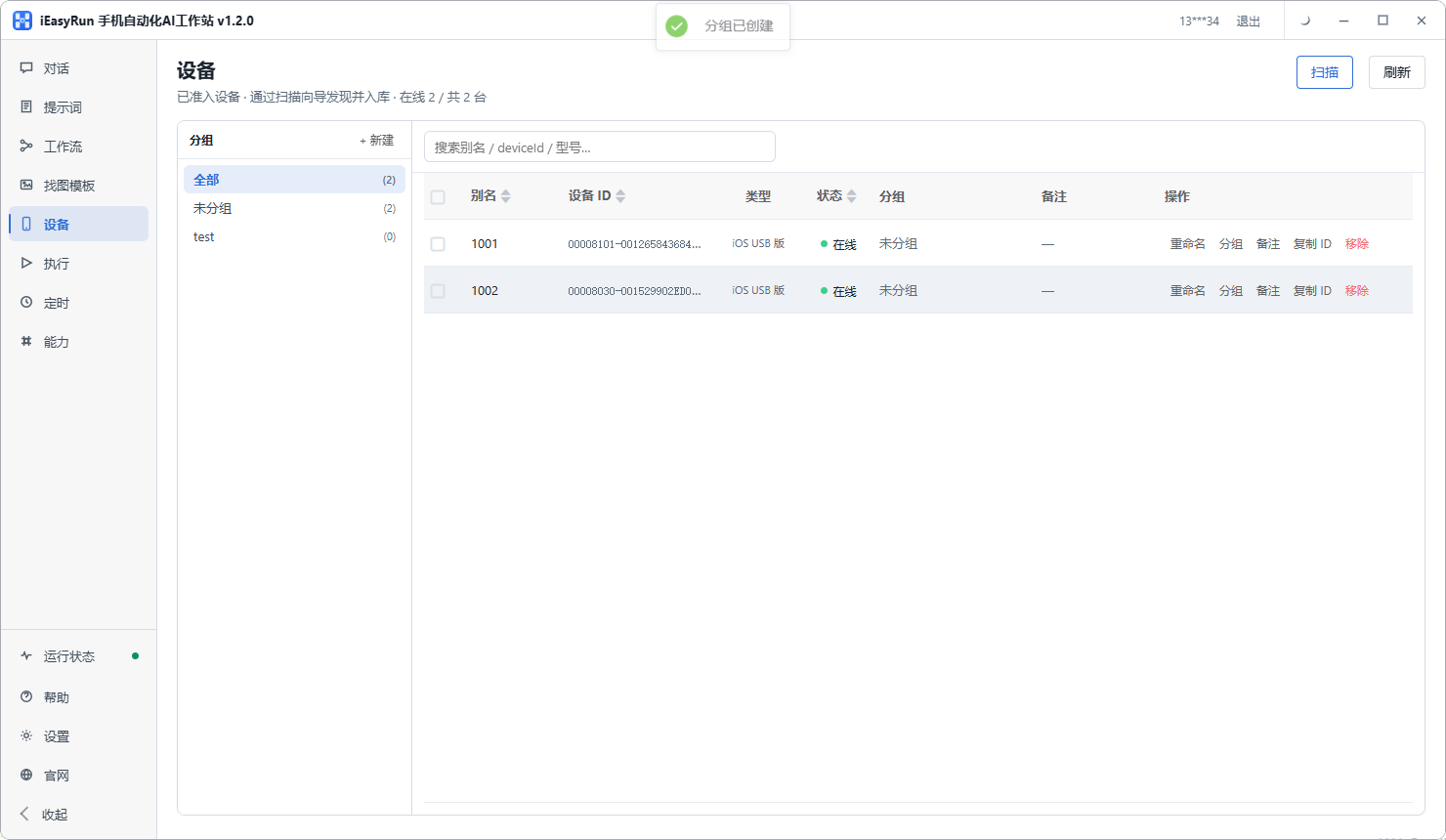
One phone per account, which is the whole point of managing multiple phones this way. Do not try to run three accounts off one phone in rotation. Switching to the wrong account is expensive, and a device cycling through logins in a short window does not look like a normal user.
Alias as market plus account name , such as US-home, DE-home, SEA-home. One look tells you which market it serves and what it publishes.
Group by market : North America in one group, Europe in another, South-East Asia in a third.
Do those three things and the account-to-device relationship is fixed. Every later task, scheduling, dispatch, troubleshooting, works from that mapping instead of re-deriving it. Aliasing and grouping are covered under Devices.
Working the times out backwards
Three steps. Do not estimate.
First, decide which market the account serves. With fourteen accounts, which one covers North America and which covers Europe should already be settled.
Second, find the active window for that market. Usually the local evening, and the specific hour depends on your content type. Check your platform analytics for history.
Third, convert it to your own time zone. This is the step that goes wrong, so write the result into the table rather than recalculating it each time.
Add two columns:
| Account | Market | Local window | Your time |
|---|---|---|---|
| US-home | US Eastern | 20:00 | 09:00 |
| DE-home | Central Europe | 19:00 | 01:00 |
| SEA-home | Singapore | 21:00 | 21:00 |
Look at the third row. Singapore at nine in the evening is your nine in the evening, since the zones are close. Central Europe at seven is one in the morning for you. Estimate that one and you will get it wrong.
With the table written, the flow reads the last column.
Laying a dozen accounts onto one timeline
This is where the real work sits.
Stagger inside each group. The five North American accounts should not all fire at 09:00. Offset them by ten or fifteen minutes. It looks less like one person operating in bulk, and when something breaks you know immediately which account it was.
Then overlay the groups. Draw the North America, Europe and South-East Asia windows across one day and you will see some slots crammed (five posts at nine in the morning) and others empty.
Split the crammed slots further, and move content that does not depend on timing into the empty ones.
After overlaying you get a picture of what your day actually looks like. That picture is something manual scheduling never shows you.
One flow per market, content as parameters
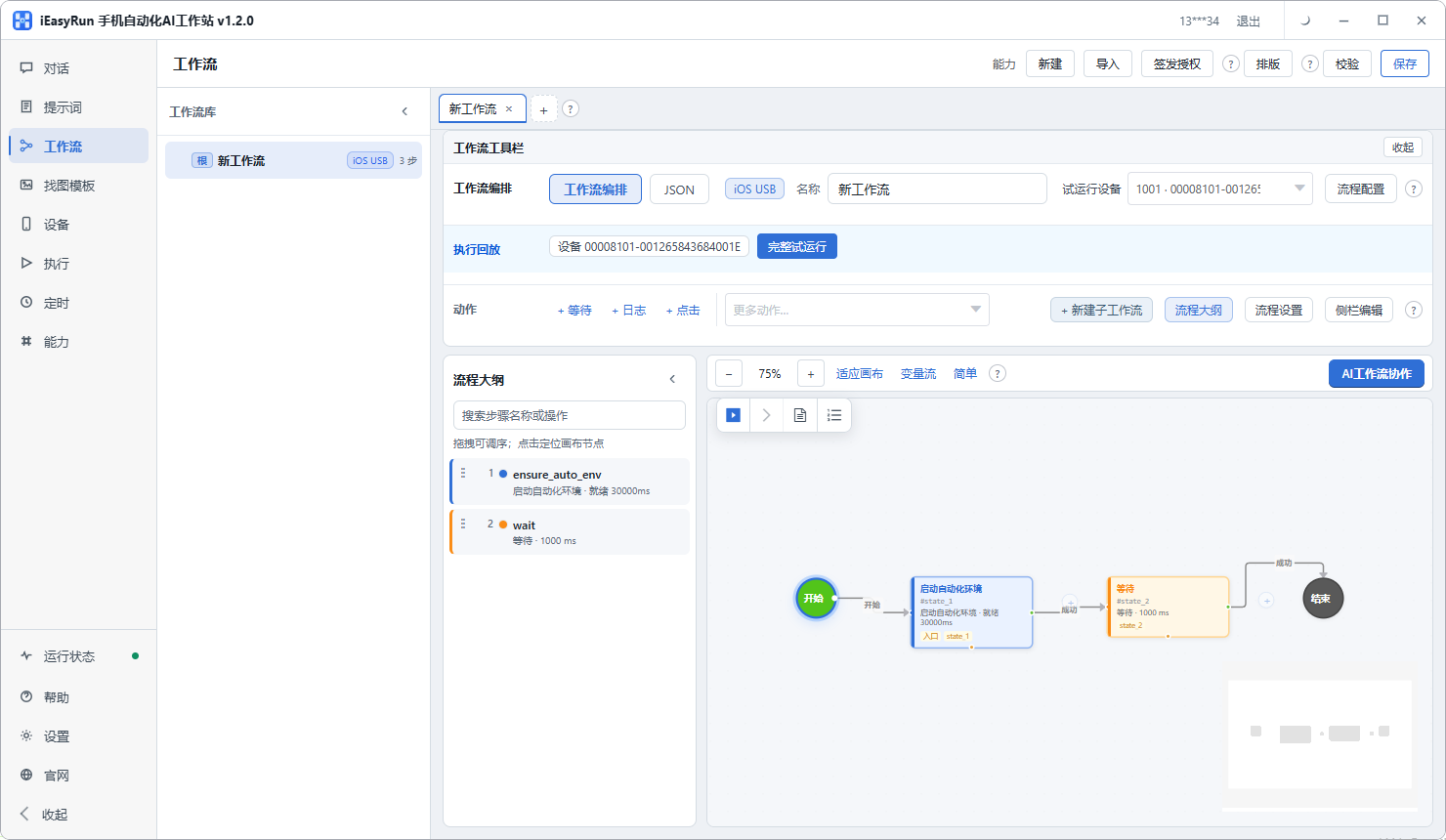
With the timeline set, multi-account scheduling comes down to configuring workflows per market: one for North America, one for Europe, one for South-East Asia.
Why not fourteen, one per account? Because within a market, the posting action is identical: same app, same entry, same fields. Only the content and the time differ, and both are parameters.
Per-market flows are cheaper to maintain. When the North America interface changes, you edit one flow and five accounts benefit.
Content travels as parameters, row by row from the table. One row means this account posts this content at this time, and the flow only executes it.
One fixed check each day
Once the schedule is set, the daily job is down to one thing: reconciling.
Pick a fixed point each day, open Execution History and read it by device group:
- Which group shows clustered failures? Investigate that one first
- Are any devices repeatedly offline? That is hardware, not the flow
- Has one account been failing consistently? That is account state
Reading by group matters because failures in a cross-border operations team tend to be patterned. Devices on one hub drop together, accounts in one market fail together. Read account by account, those patterns stay invisible.
For a small cross-border operations team, this is the whole routine: the schedule runs itself and you spend ten minutes confirming it did.
When you travel or change city
This one gets missed. With time zone publishing, your own zone moving shifts the entire timeline.
Which is another argument for keeping times in a table rather than in your head. Editing a table is far easier than editing flows, and afterwards you can see at a glance how far everything needs to move.
Anything that looks like a one-off decision but actually changes repeatedly belongs in a table, and that goes double when managing multiple phones.
The boundary
In overseas account management, this handles structure and timing: fixing the account-to-device mapping, calculating publish times from the target market, and letting the flows execute on time.
It does not handle the content and strategy side of overseas account management: what each market should get, which account deserves more investment, when to retire one. Those are operating calls, and they are the real barrier in this business.
So hand multi-account scheduling over completely, and spend every minute saved on content. Fourteen accounts, run by one person, works not because you tap quickly but because you no longer hold a timetable in your head.
Back to the home goods seller. He now spends an hour on the weekend updating the content table, runs from the table on weekdays, and reconciles once in the afternoon. Fourteen accounts went from three guarded windows to one timeline running itself. His summary: the accounts used to dictate my hours, and now I arrange theirs.
If you are managing several overseas accounts, connect the devices using the install selection page and get the aliases and groups right first. Everything else is built on that.
Frequently asked questions
- What makes overseas accounts harder than domestic ones?
- Two things. Time zones, because the target market active window does not line up with your day, so publish times have to be worked out backwards. And natural dispersion, because accounts differ by zone and language, so they cannot all run on one rhythm the way domestic accounts can.
- How do I calculate a publish time?
- Three steps: decide which market the account serves, find when users there are active, then convert that moment into your own time zone. What you get is the value to put into the schedule.
- How should a dozen accounts be spread across devices?
- One phone per account, aliased as market plus account name, for example US-home. Group by market: North America in one group, Europe in another. That fixes the relationship between account and device so you never re-derive it.
- How do I lay out one day across all of them?
- Group by market and stagger inside each group, then overlay the groups onto a single timeline. You will usually find some windows crammed and others empty, and that is the point of doing it.
- Why not fire every account on the same minute?
- Two reasons. It does not look like ordinary activity, and when something breaks you cannot tell whether one account is at fault or the flow itself. Offsetting by ten or fifteen minutes costs almost nothing.
- Time zone arithmetic is easy to get wrong. Is there another way?
- Write the converted time into your content table rather than estimating each time. One column holds the target market active window, another holds the corresponding time where you are, and the flow reads the second column.
- What if I travel or change city?
- The whole timeline shifts, because your own zone changed. Which is another reason to keep the times in a table: editing a table is far easier than editing flows, and it shows you at a glance how far everything needs to move.
- How do I find which account broke?
- Execution History records the target device and error for every task. Read it by device group. Whichever group shows clustered failures is the one to investigate, and that usually points straight at the device, the network or the flow.
Fix the mapping first
One account per phone, then work the times back from each market
Software is completely free and runs on your own computer.