
The man who listed fourteen tasks
Last month a friend who runs a Douyin matrix asked me whether a piece of AI phone control software was worth paying for.
I did not answer directly. I asked him to write down everything he had repeated on his phone over the past week. He came back with fourteen items, from checking yesterday’s numbers in the morning to replying to comments at night. It filled a page.
I crossed out eleven and kept three. He protested that the other eleven also happened every day.
That is exactly the problem. Doing something daily and being worth handing to a machine are two different things. Free phone automation software all looks similar on the feature sheet. What separates setups in real use is whether you picked the right tasks to hand over, and multi-device management only starts to show its quality once you have more than a couple of phones.
Most people picking a tool start by comparing features. Who has more, who is cheaper, who supports more systems. They still cannot decide, because the variable that matters is not in the tool. Same software, one person saves a salary, another person gains one more thing to watch every day.
This piece does not rank tools. It gives you an order for sorting tasks.
Three filters that turn fourteen into four
Three questions decide whether a task should be handed over: how often it happens, whether the screen stays put, and what it costs when it goes wrong.
| What you check | Hand it over | Think about it | Leave it alone |
|---|---|---|---|
| Time per run | One or two minutes, dozens of times a day | Three to five times a day | Once a week |
| Screen stability | Same flow, layout rarely changes | Occasional redesign | Everything moves after each update |
| Cost of a mistake | Redo it and move on | A few hundred lost | Real money, or an account at risk |
| Conclusion | Do these first | Make them half automatic | Keep them manual |
A task worth handing to AI phone control usually passes the first two and survives the third. Out of fourteen, that tends to leave no more than five.
Frequency is the one people overestimate
Doing something daily and doing it ten times a day are far apart.
If something happens two or three times a day, the time you save may not reach ten minutes, and you still have to build the flow, set the parameters and debug it when it breaks. That arithmetic does not work.
What does work is a job that takes one or two minutes and happens dozens of times a day. All three of the tasks my friend kept were that shape: replying to comments across several accounts, pushing the day’s content up on schedule, and syncing assets from cloud storage into the phone’s photo library. None of them look like much on their own. Together they ran two to three hours a day.
So the first question is not whether something can be automated. It is how many times a day and how long each time. If frequency fails, nothing further matters.
Apps that change their layout suit AI better
This one is counter-intuitive.
Most people assume an app that keeps changing should not be automated, because the script breaks with every update. That is true of traditional tap scripts. They record coordinates and control paths, so when anything moves, the script has to be edited.
AI phone control works differently. It looks at what is on the screen, reads the labels, and decides where to tap. A menu item that moved from the second row to the fifth is still found. The more often an app updates, the more this approach stands out.
The rule compresses to one sentence. If everything sits in the same place every time, scripts and AI both work. If positions keep shifting, AI saves you the maintenance.
The phrase free phone automation is easy to misread as meaning the software is capable because it costs nothing. Free solves the price of the software, not the difficulty of your task. A task unsuited to automation stays unsuited with a free tool.
What a mistake costs decides full auto or half auto
Expensive mistakes do not rule out automation, but they do require a gate.
Let the AI finish every step up to the last one and stop there for your confirmation. With a product listing, the slow parts are finding the entry, choosing the category, writing the title and uploading the images. Hand those over, and pause before the submit button appears. You still save most of the time, while the riskiest tap stays with you.
I have watched someone open up every step at once and end up with a batch of mispriced listings three days later that cost more than several phones. He did not choose the wrong tool. He left out the gate.
So what runs the rest
Once the list is down to four or five, that is when tools enter the picture.
Four things actually affect what happens six months in, and none of them appear on a feature comparison.
Where it runs. Among free phone automation software, cloud-based options usually bill per run while a local setup costs you nothing beyond electricity. Anyone who has run an online shop understands why keeping data on your own machine matters.
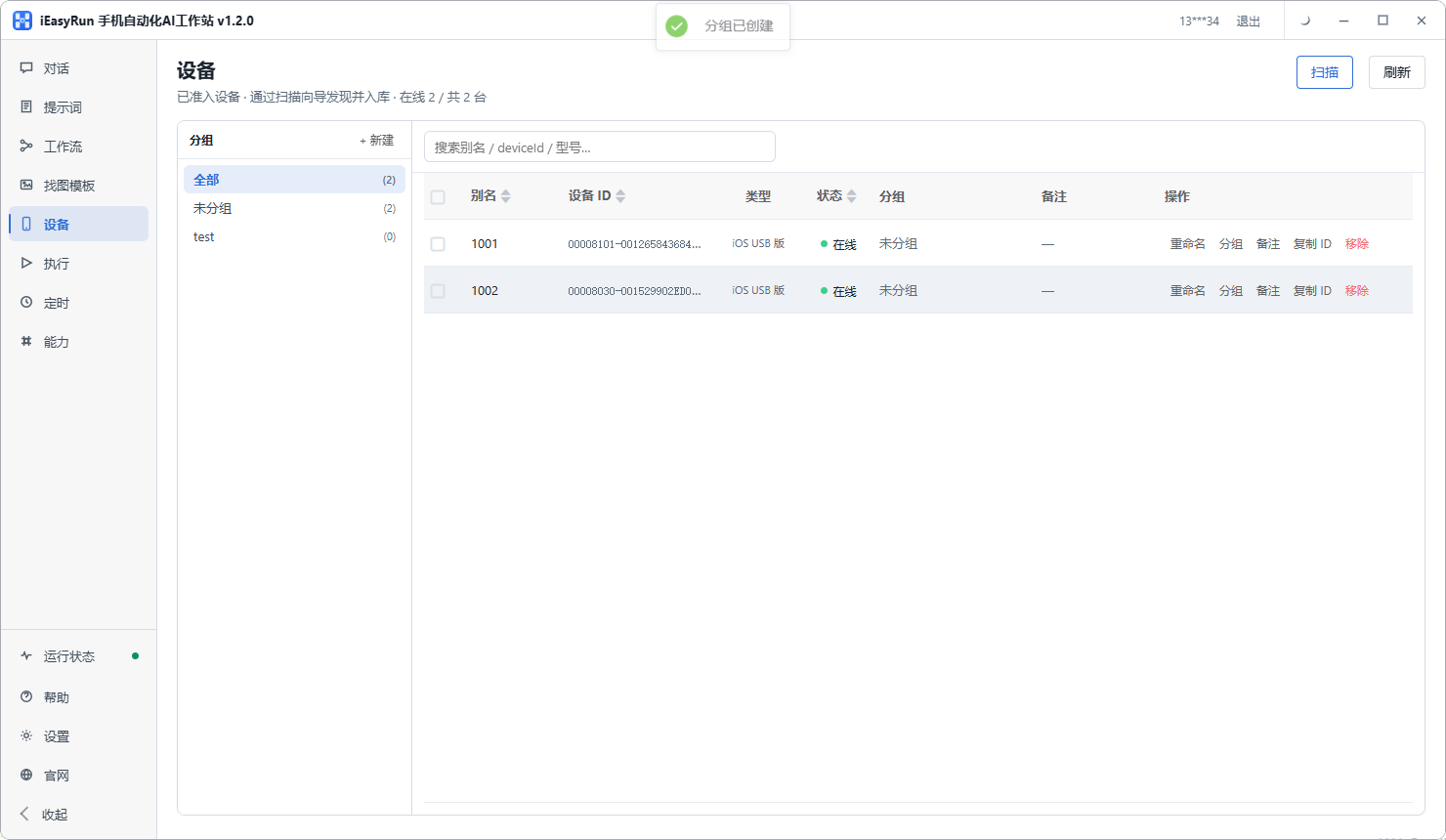
How devices are handled. This only surfaces from the second phone onward. With one phone you tap around freely. With twenty, if grouping and aliases are missing, you spend your time working out which device belongs to which account. Phone automation software that handles multi-device management badly becomes painful past ten.
Whether all three systems can live together. Studios mix Android, iOS and HarmonyOS as a matter of course. After the devices page scans a phone and adds it to the list, all three sit in one place, so selecting a device does not require remembering which setup it belongs to.
Whether one-off jobs are easy. Not everything deserves a fixed flow. Some work shows up once a month, and writing a template for it is wasted effort. Describe it in a conversation, let it run, and move on.
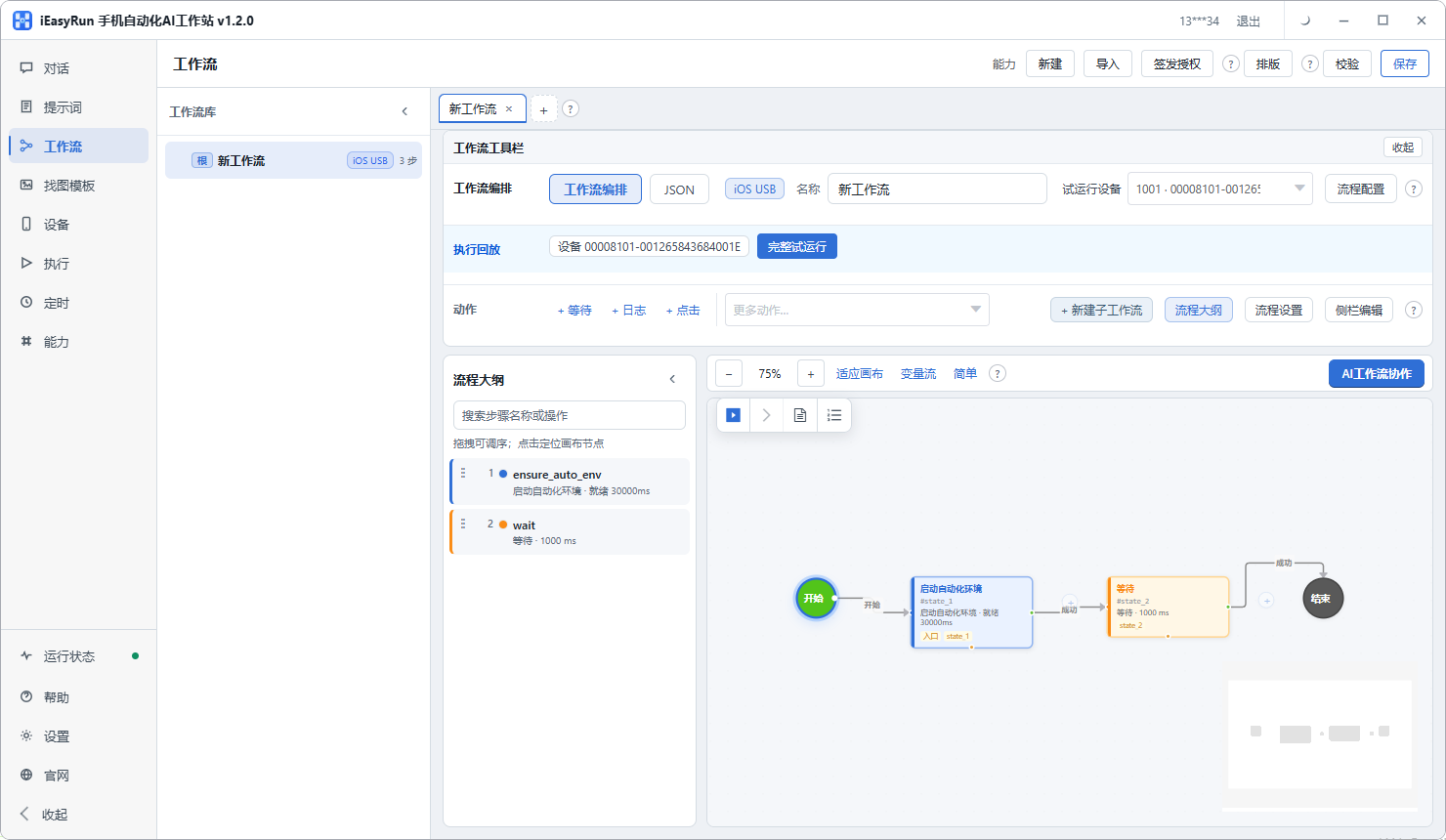
To skip the tool shopping, look at iEasyRun. It is AI phone control software that runs on your own computer, with phones joining over a cable or the same Wi-Fi network, and a documented route for Android, iOS and HarmonyOS. The install options are on the deployment page.
A decision order you can copy
Compressed into a sequence, so the next time you ask whether something should be automated you can walk it:
Frequency first. Under three times a day, cross it off and run it as a one-off conversation when you need it.
Screen stability second. A flow that never moves works either way, so leave it to a script. A flow that keeps moving goes to the AI.
Cost of a mistake last. Keep the safe parts running, make the risky parts half automatic, and pause before submission.
The real barrier with AI phone control is not installation. It is this sorting step. The same batch of tasks looks very different a month later depending on whether you filtered them or handed everything over at once.
What he kept in the end
He walked the list and ended up with three, one fewer than I had left him.
The one he cut himself was checking yesterday’s numbers each morning. His reason was that while looking at the numbers he also thinks about the next day’s topics, and handing that over would cost him his daily read on the account.
I agreed with that. Automation can take the actions but not the judgement. Knowing which is which matters more than which software you pick.
Start with the easiest of the three and run it for a week before deciding whether to add a fourth. Connecting twenty phones on day one usually ends with giving up on day two.
Frequently asked questions
- I repeat a dozen things on my phone every day. Do all of them go to the AI?
- No, and it is better not to try. Usually only four or five qualify: done daily, stable screen, and a mistake you can live with. The rest either happen too rarely to be worth automating, or cost real money when they go wrong and need a human in the loop. Get those four or five running first.
- Why would an app that keeps changing suit AI better?
- Because a traditional tap script works from coordinates and a fixed control path. Change the layout and the path breaks, so you go back and edit the script. AI phone control reads what is on the screen and decides where to tap, so a button that moved two rows down is still found. The more often an app updates, the more this matters.
- If a mistake is expensive, does that rule automation out?
- It rules out full automation, not automation. Let the AI do the whole action and stop one step before submission, then wait for your confirmation. You still save the slow part, which is finding the entry point and filling the fields, while the riskiest tap stays with you.
- Where does free phone automation software usually run out?
- Two places. Managing many phones often sits behind a paid tier, and cloud-based tools bill per run, so the invoice climbs as you use it. When you see the word free, ask what the device limit is and whether anything else starts charging once it runs.
- How many phones can one computer drive at the same time?
- It depends on the connection and the ports on your machine. Over cable, powered hubs spreading phones across separate USB controllers hold dozens. Over one Wi-Fi network you have more headroom. Power and heat usually become the limit before the software does.
- Can Android, iOS and HarmonyOS phones live in one setup?
- Yes. Once a phone is scanned and added on the devices page, all three systems sit in the same list and can be grouped and selected together. Only the connection differs, since the Android and iOS wireless builds join over Wi-Fi while the iOS USB and HarmonyOS builds come in over a cable.
- I do not want it running all the time. Can I use it occasionally?
- Yes, and that is often the best way to use it. A one-off job can just be described in a conversation, with no template and no schedule. What deserves to become a workflow is the work that repeats every single day.
- How do I know it actually finished?
- Open the execution history for that run. It records the target device, the status and any error. Early on, open every record. Once you trust it, switch to spot checks. Do not skip this, or all you will know is that something failed.
Task picked?
Try the first task on one phone
The software is completely free and runs on your own computer. One small task first beats twenty devices at once.