
The man who asked whether the two overlapped
Last month someone asked me a question. He already ran a set of Apple cluster control software, had heard about AI phone control, and wanted to know whether he needed both.
I asked him one question back. Can your current setup get today’s job running without writing any code. He paused and said no.
The conclusion first. Apple cluster control covers the device layer, and AI phone control covers the task layer. Multi-device management belongs to the first, while the phrase control phone from PC spans both. They do not compete, either works alone, and they stack. Money gets wasted when the two are treated as one thing, which is exactly where people choosing phone automation software get stuck, because the feature tables look like they overlap. Free phone automation software misleads the same way: the software can be free while the two layers cost very different amounts to run.
What he lacked was never equipment. He lacked something that could translate his intention into a chain of actions on a phone.
What each layer covers
| Device layer | Task layer | |
|---|---|---|
| Problem it solves | How phones connect, how to watch them together, how to select in bulk | What the job involves, where the next tap goes |
| Key abilities | Cable or Wi-Fi connection, mirroring, grouping, batch dispatch | Reading the screen, planning steps, executing, recording results |
| When it becomes necessary | Past ten devices | Whenever a job repeats daily |
| Skill required | Low, it works once installed | Low, describing the job in plain words is enough |
| If you skip it | Every device has to be handled individually | You own tools and still do not know what to run |
Multi-device management is really the most time-consuming part of the device layer: whether the list shows online state clearly, whether aliases can be set, whether grouping exists, whether a task can be dispatched to a group. None of it registers under five devices. At twenty, without it your day goes into finding the right phone.
When the device layer alone is enough
If someone on your team writes scripts, the device layer stands on its own.
The script handles what the job does, and the device layer keeps phones available and selectable in bulk. For work with fixed steps and an interface that will not move for six months, recording or writing it once is enough, and no AI layer is needed.
The test: are the steps fixed, the positions fixed, and the cost of a mistake manageable. Pass all three and a script runs fine. Add nothing.
When the task layer alone is enough
If your work keeps shifting position, or arrives once a month, start with the task layer on its own.
Among phone automation software going the AI route, most products carry a device list with scanning, aliases and grouping. For three or five phones that is sufficient. What you give up is the wall of mirrored screens a cluster control console provides.
What you actually need at that stage is something that understands your description and finishes the job on the phone by itself, dozens of times a day.
What it looks like with both layers
Stacked together, the division is straightforward.
The device layer keeps phones online, provides mirroring and supports selecting whole groups. The task layer turns an intention into actions, executes them and leaves a record. You pick devices and describe the job on the task layer, while the device layer keeps those phones ready to be driven.
That is why control phone from PC spans both. The device layer handles connecting and seeing, while the task layer handles what it should do. Both readings are correct, depending on which question you are asking.
Three bills, kept separate
Kept apart, the money does not get spent twice.
| Where it goes | Device layer | Task layer |
|---|---|---|
| The software | Usually licensed per device | The software itself can be free |
| Model calls | Not used | Consumed when planning on the spot, not when re-running a saved flow |
| Hardware | Hubs, cables, rack | Generally none |
| Time | Setting up the environment, cabling | Describing the job precisely |
One trap deserves its own line. Free phone automation software usually comes with a condition attached. Sometimes the software is free and model calls are yours to pay for. Sometimes there is a device limit. Sometimes the core is free and multi-device management is charged separately. Asking those three questions beats reading the price tag.
Three mistakes that waste money
The first is treating the two layers as one thing. Expecting the device layer to come with AI, or expecting the task layer to fill a screen with mirrored devices, both end in feeling you bought the wrong thing.
The second is buying devices before deciding on a job. The devices arrive, nobody knows what to run on them, and they sit idle. The order should be the other way round: find the job worth handing over, then decide whether to expand.
The third is comparing feature tables across layers. They were never meant to overlap, and comparing them produces the conclusion that neither is quite enough. Compare within a layer.
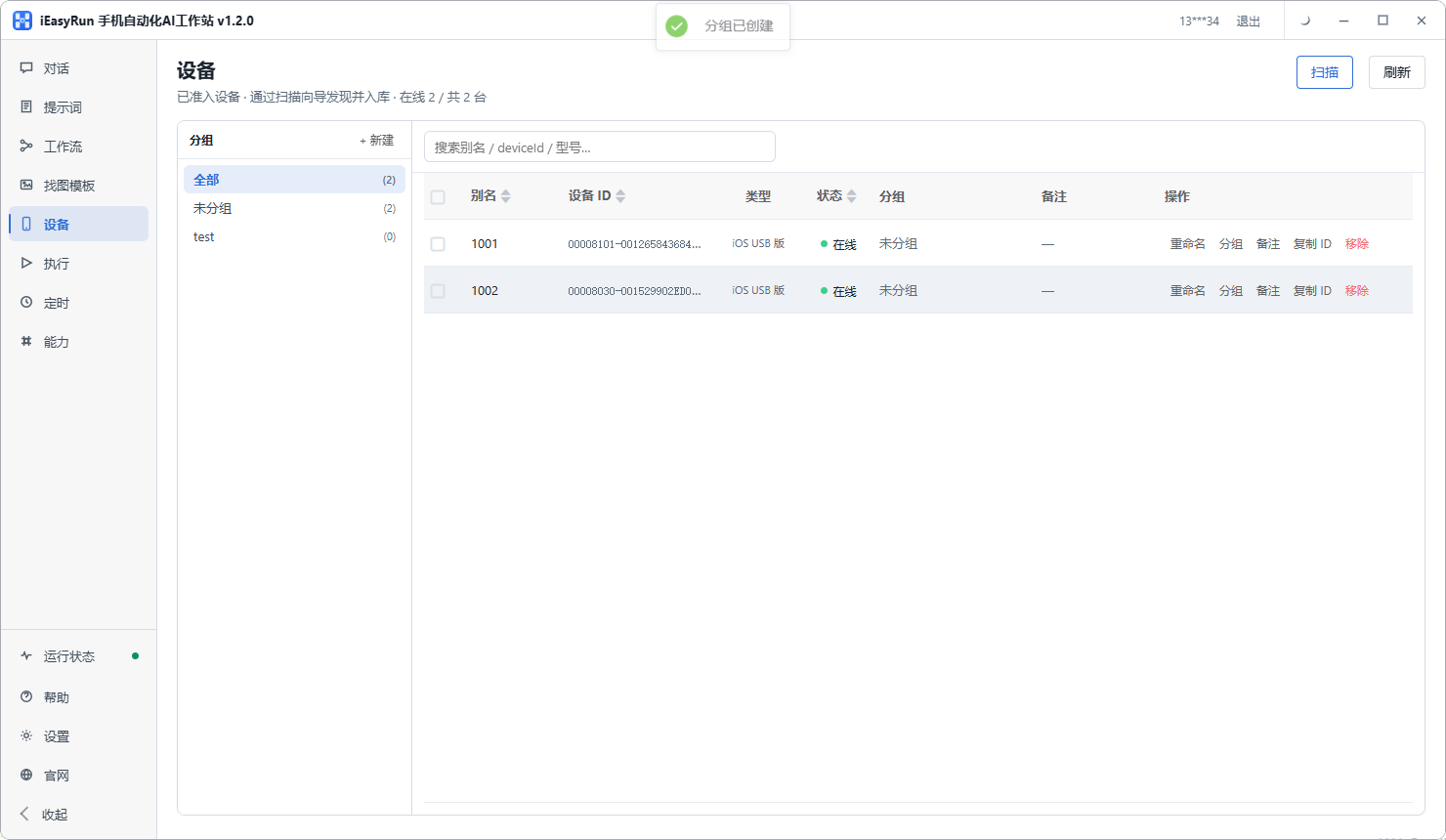
To get the task layer running first, look at iEasyRun. The workstation runs on your own computer, with iPhones joining over a cable and Android plus the wireless build over Wi-Fi, and it includes the device list, grouping and execution history. Options are on the deployment page.
What he chose in the end
I did not tell him to buy anything else.
I told him to take one phone, describe the most time-consuming job of his day clearly, and get it running. His was patrolling orders across several store back ends, twice a day, around twenty minutes each time.
He got it running in an afternoon and connected the other two phones the following week. He kept his existing device layer, and something he said in the group has stayed with me: what he was missing was never equipment, it was a layer that could understand plain language.
He now runs six phones. Under five, the software’s own list is enough, and he says he will look at mirroring again past ten. That order of decisions is far clearer than the question he started with.
Frequently asked questions
- Are cluster control systems and AI phone control competitors?
- No. Cluster control covers the device layer: connecting several or several dozen phones to a computer, watching them at once, grouping them, pushing things down in batch. AI covers the task layer: what the job actually involves, which step comes first, what to do about a pop-up. Either layer can be used alone, and they stack.
- I only have three phones. Do I need cluster control?
- Barely. Its value appears as device count climbs, and a handful of phones can be handled by eye. What you are actually missing at that size is the task layer: the job you repeat dozens of times a day needs something that understands your description. Solve that first.
- If I only buy the task layer, how do phones connect?
- Over a cable or the same Wi-Fi network. An iPhone over a cable needs one program installed and the developer trust prompt accepted, while Android and the wireless build join over Wi-Fi. The software carries a device list with scanning, aliases and grouping, just without the wall of mirrored screens a cluster control console provides.
- Do the two layers duplicate each other when used together?
- No, because the parts they cover do not overlap. The device layer keeps phones online, visible and selectable in groups. The task layer turns an intention into specific actions. In practice you pick devices and describe the job on the task layer, while the device layer keeps those phones available.
- Cluster control software already includes automation. Do I still need AI?
- That depends on whether anyone on your team writes scripts. If someone does, the built-in automation is enough. If nobody does, what you received is a set of capabilities that need code before they run, which amounts to buying something you cannot use. The test is simple: can you get today's job running without writing a line?
- Is free phone automation software actually free?
- It exists, but check what is free. Sometimes the software is free and model calls are billed separately. Sometimes the software is free with a device limit. Sometimes the core is free and multi-device management costs extra. When you see the word free, ask all three.
- What does multi-device management actually mean?
- It means everything that appears once devices multiply: whether the list shows online and running states clearly, whether aliases can be set, whether devices can be grouped, whether a task can go to a whole group, whether execution records can be reviewed. None of it registers under five devices. At twenty, without it you spend the day hunting for the right phone.
- Which layer is easier to get running first?
- The task layer. It does not require assembling a fleet first, since a single phone is enough to validate it. Once one job runs cleanly you will know exactly where the friction is, and the decision about adding devices becomes far sharper. Buying devices first and then looking for something to do usually ends with them idle.
Not sure which layer?
Get the task layer running on one phone first
The software is completely free and runs on your own computer. Decide about the device layer afterwards.